UK Castles App for Windows Phone
Use this app to find UK castles near you. The app currently has details of hundreds of medieval castles in England and Wales.
The app uses your current location to determine the nearest castles, but don't worry if you don't want the app to use your location, you can still use the app to find details of the castles.
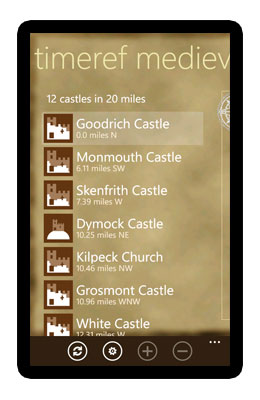
This screen is what you will see after the app has loaded. It will show those castles that are near by. The information displayed includes the name of the castle, a distance, a bearing and an icon that indicates what remains you can expect to find there.
The app will try and determine your current location as accurately as possible. While it does that the distance will include a +/- level of inaccuracy and the first button on the application bar at the foot of the screen will show as an X. You can stop the app trying to get an accurate reading by tapping the X button.
Application Bar

- Refresh your current location
- Settings
- Zoom in on map (see next screen shot)
- Zoom out on map
Map View
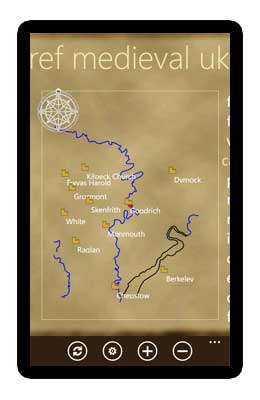
This screen shows graphically the positions of castles around you. Your position is shown as a red dot in the centre. The screen always shows north towards the top. The map shows some major rivers and coastline and is meant to give a rough guide to position and is not meant to be accurate.
If your position has not yet been determined accurately you may see a grey circle around the red dot. This indicates the level of inaccuracy.
The zoom buttons will become enabled when this screen is in focus. Use the zoom buttons on the application bar to zoom in and out.
Castle Details
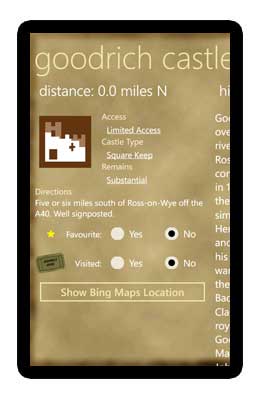
When you select a castle from the first screen above or by tapping a castle on the map the details for that castle will be displayed. The castle details pages show an overview of information, including access, castle type, remains and directions where known.
Please Note: Some castles are privately owned and are not open to the public.
On this screen are two inputs that allow to to keep track of those castles you have visited and whether you think they deserve to be added to your favourite list.
Scroll the screen to see the history of the castle (where known) and a timeline of events.
Finding Castles
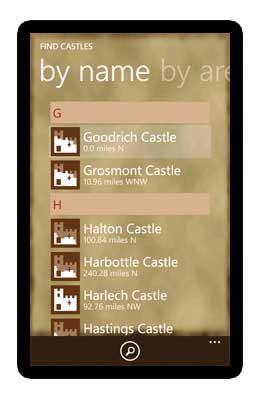
The complete list of castles can be browsed through, either by name or by county. The list is quite long so to jump to a particular letter or county tap one of the letter headings to see a list of letters or counties to jump straight to.
The single button on the application bar is a link to a search page where you can enter the name of a castle directly.